
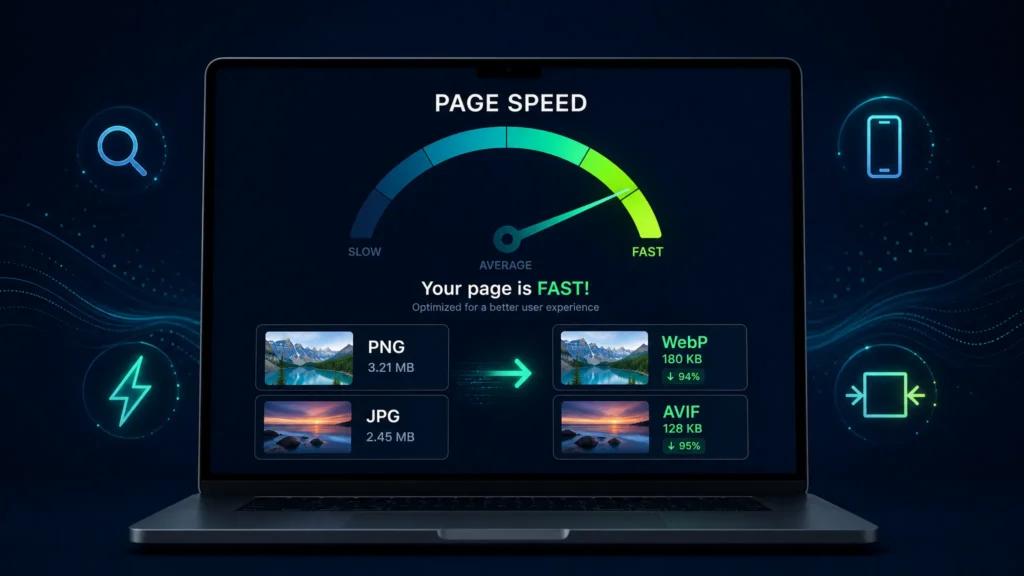

In this guide you’ll learn how image optimization for web works, which formats to use (JPEG vs PNG vs WebP vs AVIF), what “web optimized images” really means, and how to build a simple system that improves speed without sacrificing quality.
Try our Image Optimizer (convert + optimize in seconds)
If you want a quick way to convert and optimize images for your website, use our free on-page tool below. It helps you:
- Convert images to modern formats like WebP (and AVIF when supported)
- Adjust quality for the best size vs. clarity balance
- Add SEO metadata (title, alt text, description, keywords, author, location)
- Download the optimized image ready for your WordPress media library
Use the converter here:
Drag and Drop your image
o
JPG, PNG, GIF, WebP, AVIF, TIFF, BMP, SVG · Máx. 4 MB
Local SEO Metadata Optional – Improve your ranking
It appears in search results and Google Images.
Essential for accessibility and SEO.
Geographic Location
GPS coordinates are embedded in EXIF/XMP metadata to boost local SEO.
Select an image to continue.
Optimizing Image…
This may take a few seconds.
Image optimized!
HTML code ready to copy
Note: For server performance, optimized files are automatically removed after 24 hours.
Why image optimization matters for SEO and performance
Search engines and users want the same thing: fast, accessible pages that load reliably on mobile. Image optimization impacts:
- Core Web Vitals (especially LCP): large hero images often become the Largest Contentful Paint element.
- Crawl efficiency: lighter pages let bots process more URLs with the same crawl budget.
- User signals: faster pages reduce bounce rate and increase time on site.
- Google Images & Discover: correct metadata, filenames, and alt text improve relevance and visibility.
In short: optimize images for web and you usually get a double win—better rankings potential and better conversions.
What does “web optimized images” mean?
A web optimized image is one that is:
- Correctly sized in pixels for where it appears (no oversized uploads).
- Compressed to reduce file weight while keeping acceptable visual quality.
- In an efficient format (WebP/AVIF where possible, JPEG/PNG where appropriate).
- Delivered responsively (different sizes for different screens).
- SEO-friendly (descriptive filename, alt text, optional structured metadata).
How do I optimize images for web? (Step-by-step)
1) Resize to the display size (pixels first)
Don’t upload a 5000px-wide photo if your content area only needs 1200px. This is the fastest optimization you can do because it reduces data before compression even starts.
Practical targets:
- Full-width hero images: 1600–2400px wide (depending on your theme)
- Content images: 1000–1400px wide
- Thumbnails/cards: 400–800px wide
2) Convert to modern formats (WebP/AVIF)
For most photographs and complex images, converting from JPG/PNG to WebP (and sometimes AVIF) reduces file size dramatically without noticeable quality loss.
Rule of thumb:
- WebP: best overall default (broad support, great compression).
- AVIF: smaller files at similar quality, but can be slower to encode and not always supported on every server/workflow.
- JPEG: reliable fallback for photos.
- PNG: best when you need crisp edges, transparency, or UI-like graphics (logos, icons, screenshots).
3) Compress intelligently (quality settings)
Compression is where you balance size vs quality. For typical web use, you rarely need “maximum quality” exports.
Good starting points:
- WebP quality: 75–85
- JPEG quality: 70–85
- AVIF quality: 45–65 (varies by encoder)
4) Serve responsive images (srcset) and lazy loading
Modern WordPress themes usually generate srcset automatically. Ensure your images aren’t disabled from responsive behavior, and keep loading="lazy" for below-the-fold images. For the main hero image, consider preloading or avoiding lazy load so LCP improves.
5) Add SEO context (alt text, filenames, captions)
Search engines can’t “see” images like humans. You provide context with:
- Filename (before upload): use descriptive words, e.g.
image-optimization-for-web.webp - Alt text: describe what’s in the image naturally (and include the topic when relevant)
- Caption (optional): useful for editorial context and accessibility
Is 72 or 300 DPI better for web?
DPI doesn’t matter for web display. Browsers render images based on pixel dimensions (e.g., 1200×800). DPI is mainly for printing. If you’re optimizing images for a website, focus on:
- Pixel size (width/height)
- File format (WebP/AVIF/JPEG/PNG)
- Compression level
Is PNG or JPEG higher quality for web?
Neither is “always higher quality”—they’re built for different jobs:
- PNG is lossless and great for sharp edges, text, UI elements, and transparency. The downside: big file sizes for photos.
- JPEG is lossy and ideal for photographs. It can look excellent at smaller file sizes, but can introduce artifacts on text/edges.
For most photos: JPEG (or better: WebP/AVIF).
For logos/icons/UI: PNG (or SVG for vector graphics).
Is PNG or JPEG better for SEO?
SEO isn’t about PNG vs JPEG directly—it’s about what the format does to:
- Page speed (smaller is better)
- Visual clarity (don’t destroy quality)
- Accessibility (alt text)
- Relevance (context and metadata)
If a PNG is unnecessarily huge for a photo, it can hurt performance and therefore hurt SEO outcomes. If a JPEG introduces artifacts on a logo, it can hurt brand trust. Pick the format that best matches the image type—then optimize it.
Which image format is best for SEO?
Best modern answer: WebP (default) and AVIF (when your stack supports it well), with JPEG/PNG as fallbacks.
What are the disadvantages of using WebP?
WebP is excellent, but there are trade-offs you should know:
- Workflow complexity: you may need a plugin/CDN to generate and serve WebP correctly.
- Compatibility edge cases: most modern browsers support WebP, but some older setups or email clients may not.
- Editing round-trips: designers often prefer working in PNG/JPG and exporting to WebP at the end.
FAQ (for users and for Google)
How do I optimize images for web?
Resize to the display size, convert to WebP/AVIF, compress to a reasonable quality, and ensure responsive delivery via srcset and lazy loading for below-the-fold images.
How to improve image quality for a website?
Start with a high-quality source, avoid over-compression, export at the correct pixel dimensions, and use a format suited to the image type (PNG for crisp text/edges, WebP/JPEG for photos).
Is PNG or JPEG better for SEO?
Neither inherently. Use the format that produces the smallest file size while preserving needed detail, because speed and user experience influence SEO results.
What is a web optimized photo?
A web optimized photo is correctly sized in pixels, compressed, served in a modern format where possible, and includes descriptive SEO context like filename and alt text.